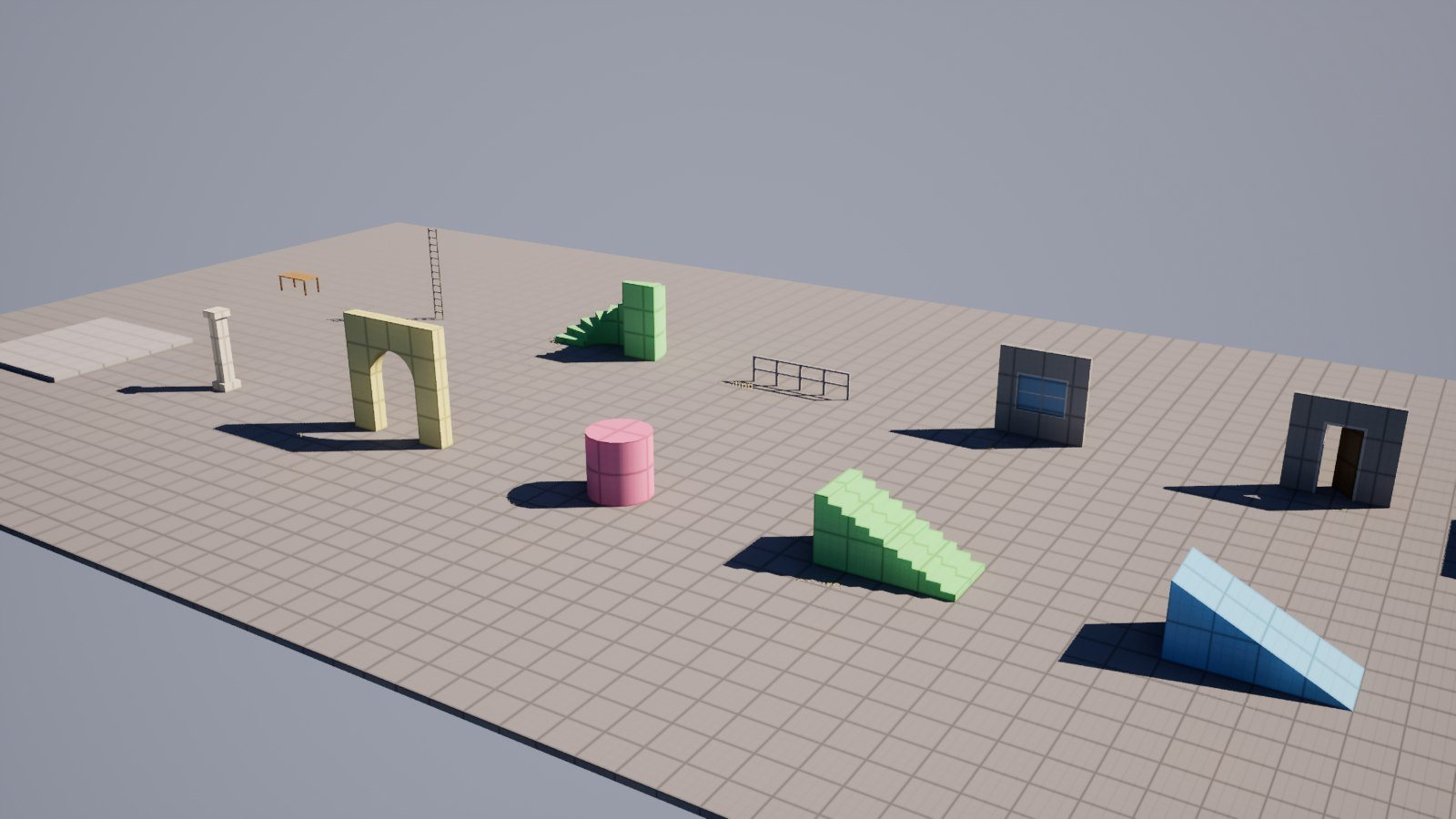
Shapes
Every built-in shape and the shared settings they all have.
Every tile on the Create tab places an LD shape—an actor that builds its mesh from a live recipe of parameters. Tweak a setting in Details, on the Edit tab, or with a viewport handle, and the mesh rebuilds on the spot. Nothing is destructive until you bake.
Settings every shape shares
You'll find these in the Details panel under Shape, Appearance and Collision:
| Setting | What it does |
|---|---|
| Shape Role | Solid, Cutter or Room. See Cutters and rooms. |
| LD Category | Colour-codes the shape by role (Floor, Wall, Cover...). See Categories and colours. |
| Color | Custom colour used when LD Category is set to Custom. |
| Grid Size | Size of the grid squares drawn on the mesh, in cm. |
| World Aligned Grid | Aligns the grid to world space instead of the actor, so adjacent pieces line up seamlessly. |
| Material Override | Swap out the blockout grid for your own material. |
| Cast Shadows | Toggle shadow casting for the shape. |
| Collision Mode | Simple (boxes and hulls), Complex As Simple (exact mesh) or None. |
| Collision Profile | Collision preset (BlockAll by default). |
Basic shapes
| Shape | Main settings |
|---|---|
| Box | Size. |
| Ramp | Size (length, width, height). |
| Stairs | Length, width, height and step count. Ramp Collision gives players a smooth ramp to walk up instead of colliding with individual steps. Cut Floor Above carves a stairwell out of any floor overhead, up to Cut Height Above. |
| Curved Stairs | Inner radius, width, height, angle (up to 720°), steps and clockwise toggle. Floating turns them into a spiral without a solid core. Also supports Cut Floor Above. |
| Cylinder | Radius, height, side count and smooth shading. |
| Arch | Width, height, thickness, opening width/height and segments. |
Architecture
| Shape | Main settings |
|---|---|
| Walls | A path of points with mitred corners. Closed Loop closes the outline into a room. Includes thickness, height, alignment (Center / Inside / Outside) and optional Floor and Ceiling slabs. |
| Floor | Any point outline—concave polygons included—plus thickness. |
| Pillar | Separate sizes for base, stretchy shaft and cap; square or Round (with configurable sides). |
| Railing | Length, height, post spacing/size, rail thickness and an optional mid rail. |
| Doorway | A wall piece with a cut opening (width, height, offset), optional frame, and an optional Door leaf controlled by Door Open Angle. Frame and door each have their own colour. |
| Window | A wall piece with an opening (width, height, sill height, offset), frame, sill, optional Glass, plus mullions and transoms. |
| Ladder | Height, width, rung spacing and rail sizes. |
| Shelving | Width, depth, height, shelf count and optional back/side panels. |
| Table | Width, depth, height, top thickness, and either legs or a Solid Base (handy for counters). |
Paths
Path shapes follow a line of points. Click them out directly (see Drawing paths) and tweak points anytime with handles.
| Shape | Main settings |
|---|---|
| Trim | Swept along a path with five profiles (Flat, Chamfer, Round, Cove, Stepped), depth, height, elevation, corner radius and side—great for skirting, kerbs and ledges. |
| Array | Repeats any other shape along a path at a set spacing, optionally rotated to follow the curve. Pick what to repeat under Element. |
| Wire | A hanging cable through 3D points, with radius, Sag, sides and smoothness. |
| River | A smoothed ribbon along a path with width, depth and per-point heights. |
| Road | See Roads. |
Nature
Low-poly props with a Seed value—change the seed to roll a fresh variation without losing your dimensions.
| Shape | Main settings |
|---|---|
| Tree | Round or pine style, height, canopy radius, trunk size, tiers, canopy lumps and detail. |
| Bush | Size, lumps and detail. |
| Rock | Size, roughness and detail. Rocks fill out their bounding box. |
Editable Mesh
An Editable Mesh holds raw geometry instead of a parametric recipe. You get one when you Collapse a shape, Detach faces in Edit Elements Pro, or Convert a Static Mesh Pro. It keeps the grid material, categories and collision settings, and you can send it straight into Unreal's Modeling Mode via the Modeling button.
Annotation shapes
Markers, notes, line paths, Player Scale and Jump Check are LD shapes too—see Markers, notes and paths, Player Metrics and Jump Check Pro.
Lighting while you block out
Because live shapes are dynamic meshes, Unreal doesn't generate mesh distance fields for them. Under Lumen's default software tracing, that means very little bounce light, sky occlusion or reflections while blocking out. If you want lighting closer to final art, enable Project Settings → Rendering → Support Hardware Ray Tracing and Lumen → Use Hardware Ray Tracing when available (requires DX12 and a ray-tracing GPU). Once you bake shapes to Static Meshes, they get normal distance fields.