Jump Check Pro
Test whether a jump works—and keep verifying it automatically as your level changes.
Placing one
- Drag Jump Check from the Annotate tab onto the takeoff spot.
- Drag the landing point to where the player should land.
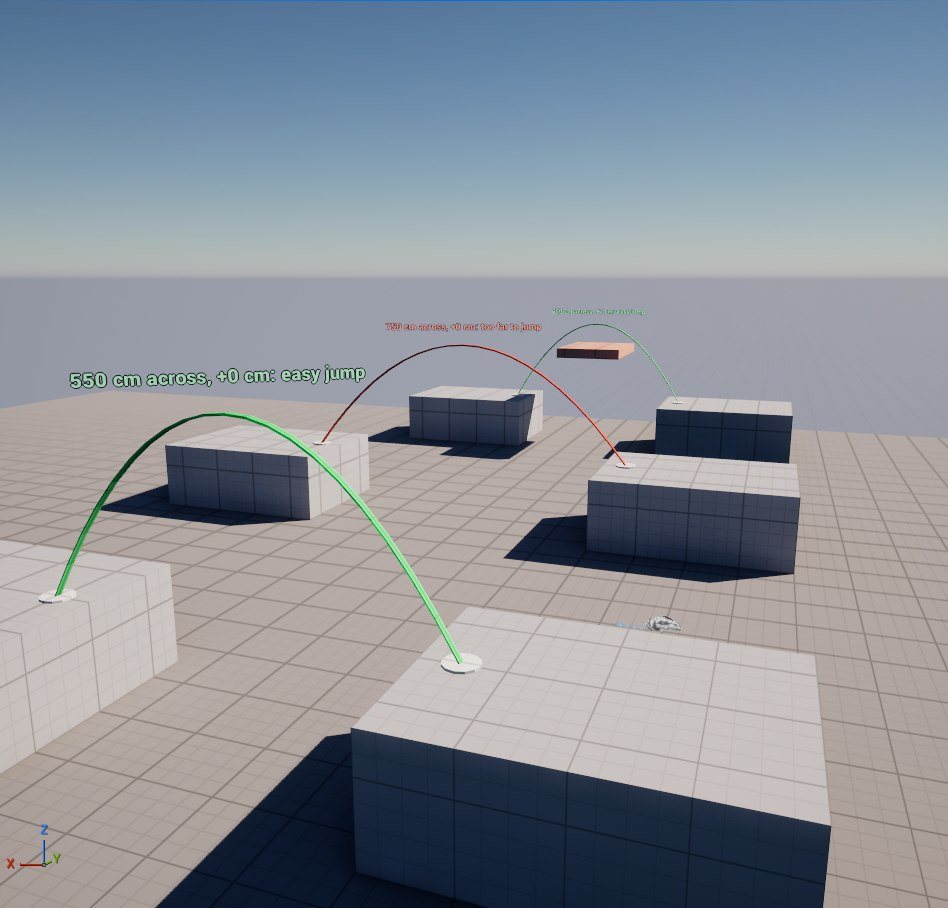
The trajectory arc updates colour based on your Player Metrics:
| Colour | Verdict |
|---|---|
| Green | Easy jump. |
| Amber | Tight jump, or requires a mantle. |
| Red | Too high, too far, or blocked by geometry (a diamond marks the collision spot). |
A floating label summarizes the jump, like 500 cm across, +100 cm: tight jump.
Automatic re-checking
- Snap To Surfaces (on by default) drops each point onto the surface beneath it, so a point inside a platform snaps to its top while a point tucked under a slab stays on the floor.
- Check Clearance (on by default) sweeps the player's capsule along the arc—if a low ceiling or wall gets in the way, the arc turns red.
- Move a platform, lower a ceiling or delete a wall, and nearby Jump Checks re-evaluate automatically. Change your jump speed or gravity in Player Metrics and they all update too.
Chains of jumps
Jump Check is a path shape, so you can build multi-jump routes: Alt + drag a point to chain another jump after it, Del to remove points, or use the point gizmo to move them in 3D. The label always reports the hardest jump in the chain.
Good to know
- Jump Checks are editor-only and stripped from play-in-editor and packaged builds. Unlit Label keeps the text readable in any lighting.
- Need a quick one-off check without placing an actor? Measure runs the same jump maths between any two clicks.